
The wait is finally over, and the Deadlock community can rejoice as the 250-day drought ends. Valve has released the latest major Deadlock content update, bringing a plethora of new features, heroes, map changes, and more. With all of these new systems and characters being presented at once, it’s a lot to take in. With this update changing the way Deadlock has been played for the past 8 months, here is a breakdown of the Deadlock City Never Sleeps Full Patch Notes.
Deadlock has received one of its biggest updates yet with City Never Sleeps, bringing a massive overhaul to New York City, six upcoming heroes, entirely new neutral enemies, The Broker and Corrupted Items, major HUD and shop improvements, accessibility additions, expanded Sandbox tools and much more.
The update dramatically changes the look and feel of the map while also introducing a huge number of quality-of-life changes across nearly every part of Deadlock.
Here is everything included in the Deadlock City Never Sleeps update.
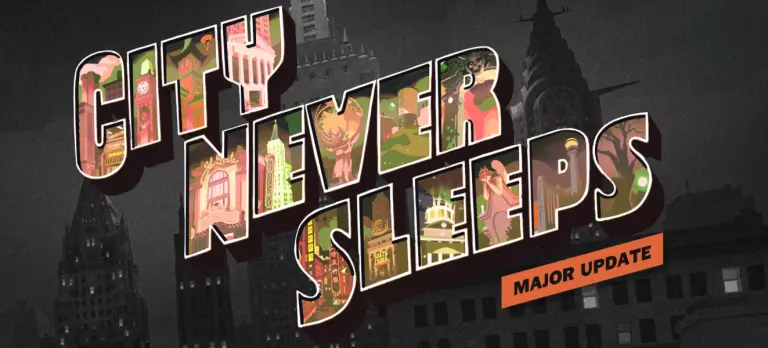
New York City has received a major visual redesign, with locations around The Cursed Apple given considerably more personality.
Several areas now have distinctive themes and new environmental elements to help make different parts of the map easier to recognize.
Uptown serves as one of the major routes through the city and provides players with a fast way to move toward important areas of the map.
Times Square has been transformed into one of the major visual landmarks of the new map and represents the busy center of Deadlock’s version of New York City.
The previous neutral enemies have been replaced or supplemented by a much wider variety of creatures.
These new Haunts have different visual designs, themes and behaviors depending on the part of the city where they appear.
The Specimen appears to be the result of either occult magic, unusual science or some combination of both.
Among the creatures associated with the Specimen are disturbing severed limbs capable of moving on their own.
Downtown remains one of the busiest areas of the city.
Something mysterious also appears to be happening underneath the subway system, with residents reportedly hearing strange noises coming from below.
The Greenwich area has also received several distinctive locations.
Umbria University is one of Deadlock’s major occult institutions and is known for its bibliomancy program.
Past Dues introduces another supernatural encounter themed around books and stories.
Central Park prominently features the Hangman’s Elm, an enormous tree that has supposedly stood in the city for roughly 300 years.
The Brownstones provide another redesigned area of the map with a heavy historical theme.
Deadlock’s Stock Exchange combines the world of Wall Street with the game’s occult setting.
Gutter Ghouls are one of the new types of Haunts.
They are essentially physical manifestations of the dark and unpleasant thoughts humanity would rather discard.
The Seaport area has been redesigned around Pier 16 and a mysterious vessel that has arrived in New York.
Barrel Mimics are another new neutral enemy.
These supernatural creatures combine the appearance of ordinary barrels with the explosive qualities players would expect from something containing gunpowder.
The Old Fairfax Factories represent the early roots of what eventually became Deadlock’s occult industrial complex.
Four areas located between the city’s main streets have been expanded into distinct Districts:
These areas are intended to feel like more active corridors connecting the larger sections of The Cursed Apple.
Stage Hands are supernatural creatures found around the theater.
Their design plays heavily into the haunted-stage theme of the Theater District.
Crabbage Pots are one of Chinatown’s new neutral encounters.
The creatures are connected to strange rituals taking place in the area and whatever supernatural force has affected the local water.
Festival Spirits turn the hopes and wishes associated with festivals into something much more dangerous.
Rather than simply representing people’s dreams, some of these spirits have become aggressive.
Shrooms are walking supernatural mushrooms created after fungal life was exposed to demonic energy.
Underhands are strange creatures that stay close to the ground while supernatural activity takes place above the Plaza District.
Their theme revolves around grasping hands and pickpocket-like behavior.
The redesigned city is not purely cosmetic.
Valve has added several new gameplay mechanics and interactable areas throughout the map.
A hidden Sunken Plaza can be found beneath the main Plaza District.
The farther players descend into it, the more isolated they become from the rest of the city.
Stamina also becomes increasingly important while navigating the area.
Valve describes the location as a high-risk, high-reward part of the map.
A Bell Tower in Chinatown contains a large concentration of Souls.
Players can attempt to collect the reward, but doing so causes the bell to ring loudly enough to alert players around the map.
This creates a risk-versus-reward objective where enemies may know someone is attempting to claim the Souls.
New Tough Crates have been placed around the map.
Unlike regular crates, these require a Heavy Melee attack to destroy.
The reward is greater, with Tough Crates containing more Souls.
The previous golden statues that provided permanent buffs have been redesigned.
The pool of possible permanent bonuses has also expanded to include:
Healing items can now be found hidden throughout New York City.
Players who learn their locations can use these snacks to recover health while moving around the map.
Steam Vents provide another new movement option.
Standing on a Steam Vent gives the hero invisibility along with a small amount of regeneration, allowing players to reposition or move through the city more safely.
One of the biggest new mechanics in City Never Sleeps is The Broker.
The Broker is a mysterious temporary merchant who appears somewhere in New York City and sells extremely powerful item upgrades.
His location is not necessarily permanent. Valve says he could operate from an Uptown alley during one appearance and move to an abandoned Chinatown storefront another time.
The reason for this is that his demonic items are illegal in New York, forcing him to continually relocate.
The Broker allows players to trade high-tier items for significantly more powerful Corrupted versions.
Valve’s update page uses Corrupted versions of Ricochet and Rapid Recharge as examples.
These upgrades come with a catch.
Corrupted Items receive both powerful benefits and negative effects.
The exact drawbacks are randomly selected from an established pool each match.
The strength of the positive and negative effects can also vary slightly.
However, once a Corrupted Item’s statistics are determined for a match, every player in that match sees the same version of that item.
The Broker’s exact timing varies between matches.
His first selection of Corrupted Items should generally become available at approximately the 30-minute mark.
Additional inventory then appears roughly every 15 minutes on average.
Players can trade eligible high-tier items for the Corrupted versions while supplies remain available.
All Deadlock Corrupted Items: Weapon, Vitality and Spirit Upgrades
The Broker is not intended to remain permanently available following the update.
Valve says he will only stay in New York for several days.
After the first new hero arrives, authorities within the game’s world will begin cracking down on his operation.
City Never Sleeps introduces six additional heroes.
They are not all becoming playable immediately. Instead, players will once again vote on the order in which Valve releases them.
Full Deadlock New Hero Release Schedule: When Does Each City Never Sleeps Hero Release?
The six heroes are:
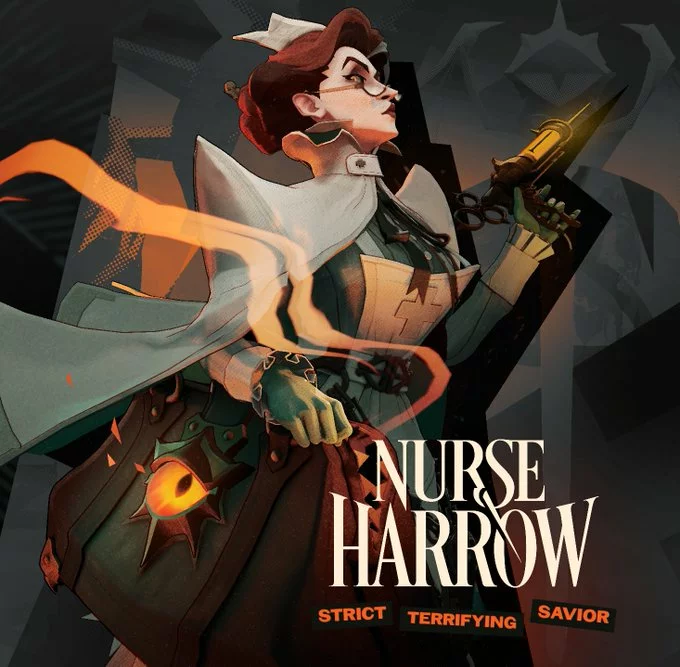
Nurse Harrow is presented as a strict and intimidating medical-themed hero that looks like she will be terrifying for all the right reasons.
Deadlock Nurse Harrow Release Date: When Does Nurse Harrow Release?
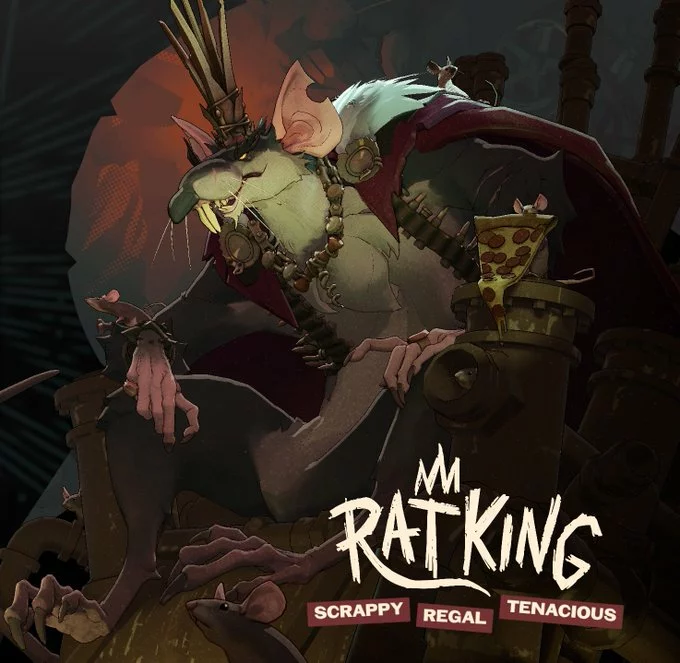
The rumors were true! The Rat King is here and he is ready to bring the fight to the mean streets of The Cursed Apple.
Deadlock Rat King Release Date: When Does Rat King Release?
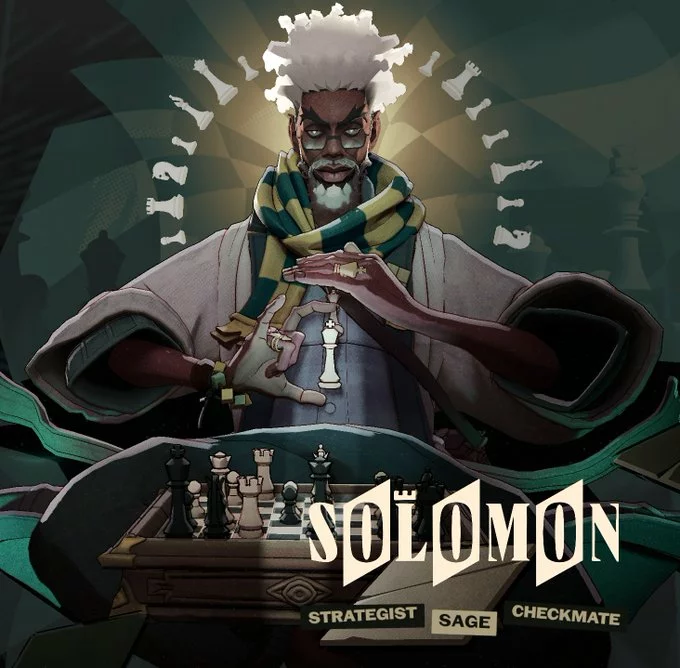
Solomon has a strategic chess theme and is described as a highly focused character who is always looking to put his opponents into checkmate.
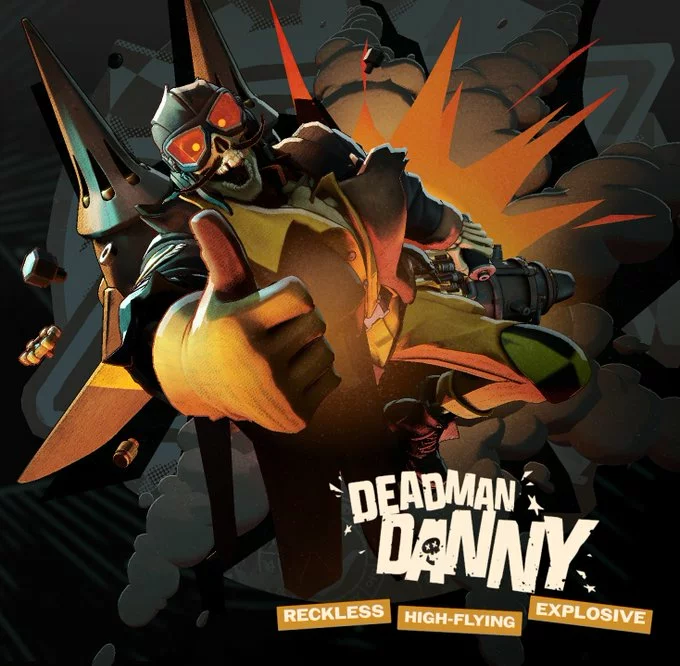
Deadman Danny is about to bring some fun and explosive gameplay.
Deadlock Deadman Danny Release Date: When Does Deadman Danny Release?
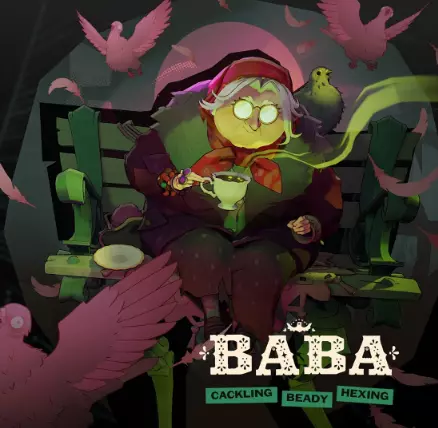
Baba looks like she is straight out of Home Alone 2 but actually evil.
Violet brings the first painter hero to Deadlock, a MOBA staple.
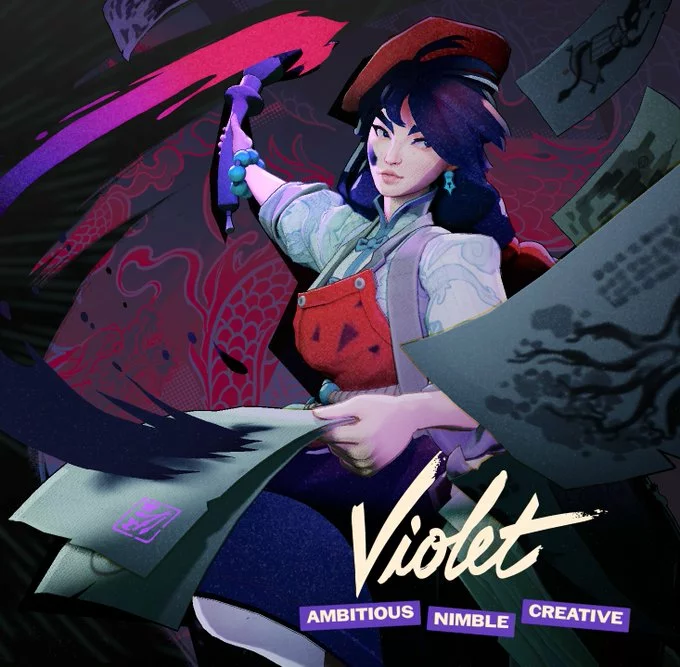
Players determine the order in which the six heroes become available.
Valve plans to release two heroes per week.
New heroes are scheduled to arrive on:
Tuesdays at 2:00 PM PT
and
Fridays at 2:00 PM PT
The first hero from the City Never Sleeps group is scheduled to arrive on October 2, 2026.
Hero voting has been moved directly into the Pregame lobby.
Players can discuss their choices with teammates and attempt to convince the rest of the team to support a particular hero.
Votes belonging to the team that wins the match are worth double.
A player’s first victory of the day also provides double voting power.
After the first new hero releases, players will be able to earn Priority Tokens while playing.
These will help players get opportunities to play newly released heroes.
Players can also show support for the hero they want released next through campaign-style posters.
Hero health bars have undergone a major redesign.
The goal is to provide significantly more information without forcing players to look elsewhere on the screen during fights.
Party members and allies should now be easier to identify during chaotic fights.
A new indicator shows when a hero has a Rejuvenator use available.
Players can more easily tell when an ally’s Ultimate is available.
Current health values can now update directly on the health bar as a target takes damage.
Heroes at critically low health are much easier to identify.
Players can see information about enemy Stamina, providing a better indication of whether an opponent still has movement options available.
Neutral NPC health bars display additional information including:
Health bars for objectives and other objects now provide more useful information about their actual durability.
Players have additional control over how damage numbers appear.
This includes options that can combine or accumulate damage values.
City Never Sleeps introduces several substantial HUD changes.
Allies are easier to locate even when they are far away.
The statistics interface has been reorganized to make it easier to understand the current strength of a hero and build.
Players can more quickly see where their Souls and other resources have been invested and when their build reaches important power spikes.
Stat changes caused by effects during combat should now be easier to understand.
When looking at an item in the shop, players can see how purchasing it would affect their current statistics.
Stacking effects and effect durations are easier to track.
Valve specifically highlights effects such as Love Bites as an example.
The targeting interface has been cleaned up to reduce unnecessary elements that could obstruct a player’s view of their target.
The Event Feed now communicates more information about what is happening during a match.
Kills now show which ability or item actually delivered the final blow.
Players can see the total bounty for a target as well as the amount they personally received.
After a kill creates a Soul Bag, the interface provides a reminder to pick it up before another teammate does.
The Deadlock shop has received substantial interface and navigation improvements.
Players can continue seeing important information such as the Kill Feed and incoming messages while shopping.
The Scoreboard can also be opened while inside the shop.
A new Popular Items section uses current player data to show items commonly purchased on the selected hero.
Item tooltips can display additional information about:
Players can filter items based on specific statistics and properties.
Multiple filters can be combined to narrow down the exact type of item a player wants.
The build interface has received numerous changes including:
Search, scrolling, focus management and general navigation have been improved.
By default, the number keys 1 through 6 can be used to switch between shop tabs.
Deadlock’s communication system has received major improvements.
The interactive ping wheel on the Minimap has been expanded with more communication options.
Players can communicate additional information about heroes by interacting with the Topbar.
Ability pings can dynamically communicate useful information including important cooldowns.
Players can now see when another player is typing.
This applies to both teammates and opponents where appropriate.
Many additional objects can now be pinged, including:
Valve has added or updated more than 15,000 voice lines connected to the ping system.
Players can ping items in the shop.
These pings can communicate that the player intends to purchase an item or has already bought it.
Enemy pings can communicate additional context such as:
When several enemy heroes appear close together on the Minimap, the ping system can communicate how many enemies are present.
Valve has significantly expanded Deadlock’s character dialogue.
The number of pregame conversations between existing and new heroes has increased from more than 700 to approximately 1,500.
More than 10,000 additional non-ping voice lines have also been added.
Players can now access an interface that allows them to listen to available Hero and Patron dialogue directly inside Deadlock.
The post-game interface makes it easier to see how many Commends a player received.
Selecting a hero who Commended you can also allow you to Commend that player in return.
Troopers received updates to:
The Minimap now includes labels identifying the different lanes and Districts.
Veils around the map have received visual and rendering improvements.
Barriers applied to the player’s own hero are now less visually intrusive.
When Parry is unavailable, its cooldown can be displayed near the crosshair.
When standing close to a Haunt or Midboss spawn area, players can see how long remains before the encounter respawns.
The Topbar now displays a Midboss respawn timer.
Post-game statistics include information showing the permanent buffs collected by players throughout the match.
Custom Lobbies now support up to eight spectators.
The Hideout camera can be zoomed farther away from the hero.
When a permanent buff is collected, its type appears above the hero.
City Never Sleeps adds a dedicated collection of accessibility settings covering visual, audio and control options.
Players can independently customize the colors used for enemy-related interface elements.
Subtitles can now be enabled for in-game character dialogue.
Players can customize:
Double-tapping the forward movement input activates automatic movement.
The player no longer needs to continuously hold the movement key.
Pressing forward or backward again cancels Auto Move.
Heroes can automatically climb appropriate ledges while moving forward without requiring a separate Jump input.
The feature can also function when moving backward.
Players can enable a control behavior where firing continues without holding the Fire button.
Pressing Fire again stops firing, while another press resumes it.
Players can reduce camera shake caused by:
The fill color and border color of the reticle can now be configured separately.
Valve has significantly expanded Deadlock’s Sandbox tools.
These additions should make the mode substantially more useful for build testing, movement testing, ability interactions and content creation.
Players can record actions performed by a bot and replay those actions later.
Recorded sequences allow more complicated scenarios and interactions to be tested repeatedly.
A recorded bot sequence can be set to repeat continuously.
Bot recordings can be shared with other players.
A detailed combat log is available for interactions with test bots.
The Combat Log breaks down individual instances of damage and their damage types.
Players can see which modifiers were active during the interaction.
A real-time movement-speed graph has been added.
Players can monitor their speed while testing different movement mechanics and combat situations.
The system can be used to determine how crowd control and other effects alter movement.
Players can test movement routes across the city to determine faster ways of traveling around the map.
Sandbox now provides a dedicated DPS meter showing both DPS and total damage.
A combat test is treated as finished three seconds after the last damage instance.
The result stays visible until another damage test begins.
It displays:
This makes it much easier to directly compare the damage output of different builds.
More hero-state settings are available for testing.
Normal map spawns can be enabled or disabled.
Players can directly give their hero permanent buffs while testing.
The camera can be positioned and moved around a hero for testing or recording footage.
HUD elements and health bars can be hidden.
Sandbox provides additional information about item categories including:
Target Dummy behavior can be adjusted through additional settings.
Players can manually spawn numerous objects including:
Players can instantly kill or heal the object currently being targeted.
Frequently used tools such as noclip can be assigned directly to hotkeys.
Players can make map entities ignore their hero and grant themselves additional movement speed for easier map exploration.
Bots can be instructed to:
Sandbox options now provide explanatory tooltips.
Testing tools have been reorganized to make the menu easier to navigate.
Free Shopping Mode can now be toggled on or off.
The Sandbox menu can remain open after the Scoreboard key is released.
The mouse cursor can also be unlocked for continuous interaction with the menu.
Players can visualize weapon damage falloff.
The tool shows:
Players can receive a notification when action is taken against someone they previously reported.
Valve has added a stronger real-time system for communication violations.
If a player is reported during a match and the system verifies abusive communication, that player can be muted for the remainder of the current match.
The offending player can also receive a 30-day communication ban.
Deadlock’s Settings menu has received a significant redesign.
Players can view a visual map of their current keyboard and mouse bindings.
The interface makes it easier to see:
More actions that previously could not be rebound now support custom bindings.
Additional camera and control settings are available specifically for the Hideout.
Players can select an unused key and directly choose which command they want assigned to it.
Players can export certain control and reticle configurations as shareable codes.
A dedicated system can generate and apply Deadlock settings codes.
Reticle configurations have their own simplified share code.
Settings contained in another player’s code can be previewed before being permanently applied.
Players can also undo imported changes.
Players watching a live match or replay have additional shortcuts for navigating between heroes using the Topbar.
Customizable controls allow users to cycle through players.
The Free Camera can now move while a replay is paused.
More control is available over spectator and replay cameras.
Users can choose whether the camera automatically returns to the perspective of the player currently being observed.
The opacity and fade distance of the observed hero and other characters can be adjusted when the camera gets close to them.
Users can manually modify:
Players can decide whether numerical health values appear inside health bars.
Options are available for changing how cumulative damage is displayed against targets.
Numerical health values can be displayed on ally health bars when those allies take damage.
Reticle previews can now demonstrate how the crosshair behaves during actual gameplay.
This includes movement caused by:
Options that have been changed from their default value are visually marked.
Connecting or disconnecting speakers, headphones or microphones is now reflected immediately inside the Settings menu.
Many options can be configured separately for individual heroes.
Holding TAB inside the Settings menu highlights settings that support hero-specific configuration.
Deadlock attempts to detect the physical layout and shape of the player’s keyboard.
Japanese, Chinese and Korean players can use IME input for text entry and hero searches.
Cursor size can now be adjusted.
The mouse wheel can be assigned to more actions instead of being limited to standard mouse buttons.
A Hero Selector has been added to Settings navigation.
This makes it easier to compare and modify hero-specific configurations.
The Settings menu remembers the last section the player was viewing between sessions.
Players can preview graphics changes while adjusting settings.
The menu temporarily becomes transparent so the visual result can be seen immediately.
Additional settings are now stored in the cloud.
Multiple players using the same computer can also maintain separate configurations.
Changed settings now include individual reset controls.
Players can reset every setting or select specific groups of settings to restore.
The previous individual RGB sliders have been replaced with a more convenient spectrum and color-picker system.
City Never Sleeps also includes a long list of technical changes, bug fixes and smaller gameplay improvements.
City Never Sleeps is a massive update, maybe more of an overhaul.
Between the complete visual overhaul of New York City, new Haunts, additional objectives, six upcoming heroes, The Broker and Corrupted Items, major interface changes, thousands of new voice lines, expanded accessibility options and the enormous Sandbox upgrade, nearly every area of Deadlock has received some kind of improvement.
The first of the six new heroes is scheduled to arrive on October 2, with players determining the release order through the new voting system.
Follow The Game Haus on Google. Add The Game Haus as a Preferred Source to see more of our gaming, esports, and sports coverage in Google Search.
Stay Connected
You can read more pieces like “Deadlock City Never Sleeps Full Patch Notes!” and ‘Like‘ The Game Haus on Facebook and ‘Follow‘ us on Twitter for more sports and esports articles from other great TGH writers, along with Varno!
“From Our Haus to Yours


Players must be 21 years of age or older or reach the minimum age for gambling in their respective state and located in jurisdictions where online gambling is legal. Please play responsibly. Bet with your head, not over it. If you or someone you know has a gambling problem, and wants help, call or visit: (a) the Council on Compulsive Gambling of New Jersey at 1-800-Gambler or www.800gambler.org; or (b) Gamblers Anonymous at 855-2-CALL-GA or www.gamblersanonymous.org.